What changed for cookies in 2026 and what to do about it
Third-party cookies are finally gone, consent fatigue is real, and the regulatory floor just got higher

Table of contents
- The cookie landscape in 2026
- What specifically changed
- Chrome's third-party cookie deprecation is complete
- EU consent rules tightened further
- Users are blocking more aggressively
- What to do about it
- Audit your current cookie usage
- Migrate to first-party analytics where possible
- Fix your consent banner
- Accept that you will collect less data
- What has not changed
- Key takeaways
- FAQ
- Sources
The cookie landscape in 2026
Third-party cookies are now effectively dead across all major browsers. Chrome finally completed its multi-year deprecation in late 2025, joining Safari and Firefox. At the same time, European regulators issued new guidance that makes "reject all" buttons mandatory and buries legitimate interest as a legal basis for most tracking. The result is a web where consent is harder to obtain, tracking is more constrained, and first-party data has become the only reliable foundation.
This is not a crisis. It is a correction. The previous model—where dozens of vendors could silently track users across the web—was never sustainable. What we have now is messier in the short term but more honest about what data collection actually requires: explicit user permission and a direct relationship.
What specifically changed

Chrome's third-party cookie deprecation is complete
Chrome was the last major browser to support third-party cookies by default. As of Q4 2025, they are blocked for all users unless explicitly enabled in settings. The Privacy Sandbox APIs—Topics, Protected Audience, Attribution Reporting—are live, but adoption remains low. Most advertisers are still figuring out whether these APIs deliver enough signal to justify the integration work.
For site owners, this means any analytics, advertising, or personalization that relied on cross-site cookies no longer works in Chrome unless you have migrated to a first-party or Privacy Sandbox approach. If you were already compliant in Safari and Firefox, Chrome's change is just an expansion of the same constraints.
EU consent rules tightened further
The European Data Protection Board issued updated guidelines in early 2026 that clarify two points:
- Reject-all buttons must be as prominent as accept-all buttons. Dark patterns that bury the rejection option or require multiple clicks are now explicitly non-compliant. Regulators have started issuing fines for interfaces that make rejection harder than acceptance.
- Legitimate interest can no longer be used for most advertising and analytics. The guidance narrows the interpretation of Article 6(1)(f) GDPR, making it clear that tracking users across sessions or sites requires consent, not just a legitimate interest assessment. This affects many analytics platforms that previously avoided consent banners by claiming legitimate interest.
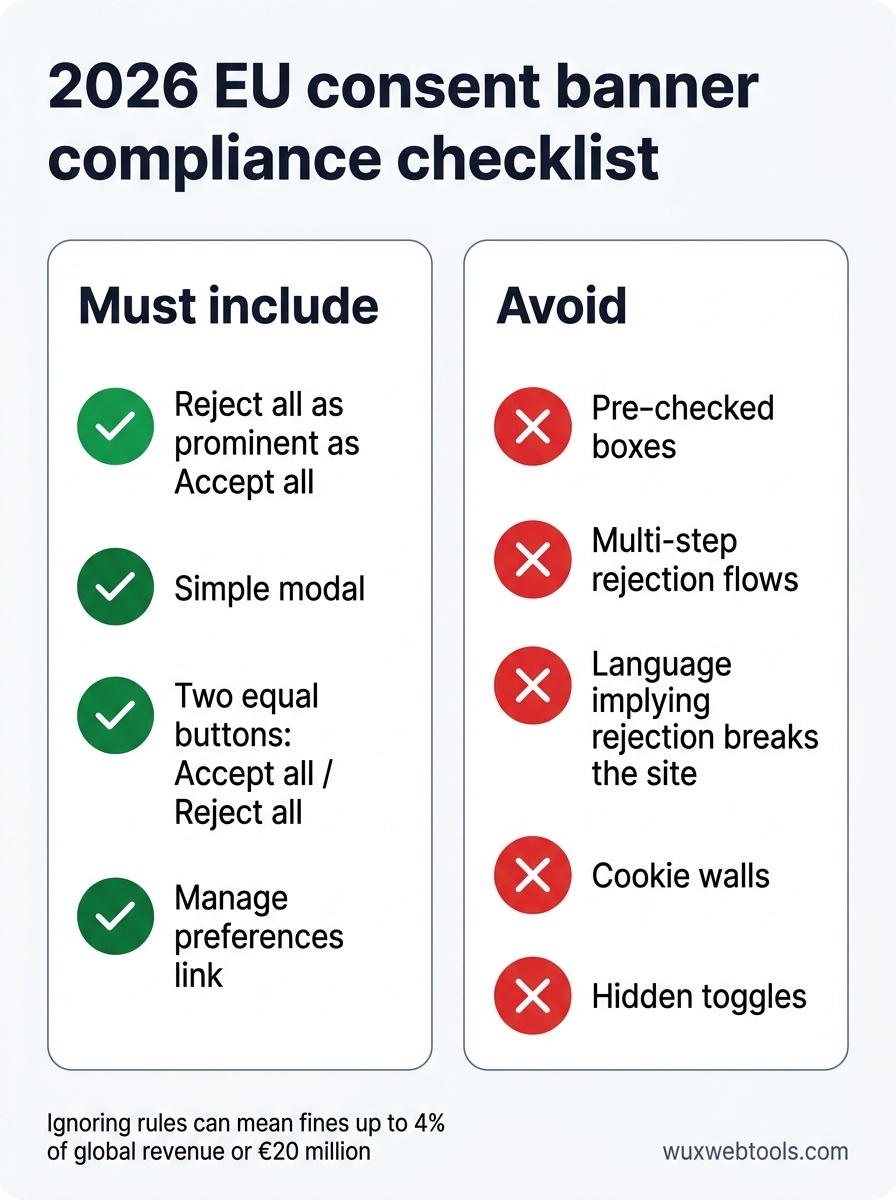
If your site serves EU users, your consent banner probably needs updating. The new standard is a simple modal with two equally visible buttons: accept and reject. No pre-checked boxes, no hidden toggles, no multi-step rejection flows.
Users are blocking more aggressively
Browser extensions like uBlock Origin and Ghostery have always existed, but usage has grown steadily. More importantly, browsers themselves now ship with increasingly aggressive blocking by default. Safari's Intelligent Tracking Prevention blocks most third-party cookies and limits first-party cookies to seven days of storage after the last user interaction. Firefox's Enhanced Tracking Protection does similar work.
The practical effect is that even compliant, first-party analytics are getting noisier. Session stitching across devices is harder. Return visitor tracking is less reliable. If your analytics show a drop in returning users over the past year, this is likely why.
What to do about it

Audit your current cookie usage
Start by understanding what cookies your site actually sets. Many sites have accumulated cookies from vendors they no longer use or scripts that were added years ago and never removed. A cookie audit is straightforward: open your site in an incognito window, check the browser's developer tools under Application > Cookies, and document everything you see.
For each cookie, ask:
- What sets it? (First-party script, third-party vendor, etc.)
- What is it used for? (Analytics, advertising, authentication, preferences, etc.)
- Is it still necessary?
- Does it require consent under GDPR or ePrivacy?
If you find cookies you cannot explain, remove them. If you find third-party cookies from advertising or analytics vendors, check whether those vendors have migrated to first-party or Privacy Sandbox approaches. If not, you need a replacement.
Migrate to first-party analytics where possible
Third-party analytics platforms like Google Analytics still work, but they now require explicit consent in the EU and face increasing blocking from privacy-focused users. First-party analytics—where the tracking script runs on your own domain and stores data on your own infrastructure—faces fewer obstacles.
This does not mean you need to build your own analytics platform. Several vendors now offer first-party analytics that proxy requests through your domain and store data in a way that respects user privacy by default. The trade-off is usually less cross-site tracking and fewer integrations with advertising platforms, but the data you do collect is more reliable and less likely to be blocked.
If you are still using Google Analytics, consider whether you actually need cross-site tracking and advertising integrations. For many sites, the answer is no. A simpler, first-party analytics setup that focuses on page views, referrers, and basic user flows is often sufficient and far easier to keep compliant. Processing data in the browser has become a viable strategy for many privacy-sensitive tasks, and analytics is no exception.
Fix your consent banner
If your consent banner does not have an equally prominent "reject all" button, fix it now. The EU guidance is clear, and regulators are actively enforcing it. The new standard is a simple modal with two buttons of equal visual weight: "Accept all" and "Reject all." Granular controls can be available via a "Manage preferences" link, but the default choice should be binary and obvious.
Avoid:
- Pre-checked boxes in the granular settings
- Rejection flows that require multiple clicks
- Language that implies rejection will break the site
- Walls that block content until the user accepts
If you are using a consent management platform (CMP), check whether it has updated its templates to match the new guidance. Many have not.
Accept that you will collect less data
This is the hardest adjustment. Even with a compliant consent banner and first-party analytics, a significant portion of your users will reject tracking or block it at the browser level. Your analytics will show fewer users, shorter sessions, and less cross-device continuity. This is not a bug. This is the new baseline.
The solution is not to find cleverer ways to track users without consent. The solution is to build a business model that works with less data. Focus on the users who do consent, optimize for direct relationships, and accept that aggregate trends matter more than individual tracking.
What has not changed
Authentication cookies, shopping cart cookies, and preference cookies do not require consent under GDPR. If a cookie is strictly necessary for the site to function, you can set it without asking. The confusion here is that "strictly necessary" has a narrow legal definition. Analytics cookies are not strictly necessary. Advertising cookies are not strictly necessary. Even some preference cookies—like language selection—are not strictly necessary if the site can infer the user's language from their browser settings.
When in doubt, ask for consent. The cost of a consent banner is lower than the cost of a GDPR fine.
Key takeaways
- Third-party cookies are now blocked by default in all major browsers, making cross-site tracking effectively impossible without user opt-in.
- EU consent rules now require equally prominent "accept" and "reject" buttons, and legitimate interest can no longer be used as a legal basis for most tracking.
- First-party analytics and Privacy Sandbox APIs are the main alternatives, but both require explicit consent in the EU and face increasing browser-level blocking.
- Many sites are still setting unnecessary cookies from old vendor integrations—audit your cookies and remove anything you do not actively use.
- Accept that you will collect less data going forward; the solution is to build a business model that works with less tracking, not to find new ways around consent requirements.
FAQ
Q: Do I need consent for Google Analytics in 2026?
A: Yes, if you serve EU users. Google Analytics sets cookies that track users across sessions, which requires explicit consent under GDPR. The fact that Google now offers a "cookieless" mode does not change this—any persistent user tracking, even via fingerprinting or first-party identifiers, requires consent in the EU.
Q: Are Privacy Sandbox APIs a real alternative to third-party cookies?
A: In theory, yes. In practice, adoption is still low and the APIs are more constrained than what third-party cookies allowed. Topics API provides interest categories instead of individual tracking. Protected Audience API allows remarketing but with less granular targeting. Attribution Reporting API provides conversion data but with noise added for privacy. For most small sites, first-party analytics is a simpler and more reliable path.
Q: What happens if I just ignore the new consent rules?
A: EU regulators are actively enforcing GDPR and ePrivacy, and fines are significant—up to 4% of global revenue or €20 million, whichever is higher. Even small sites are not immune; regulators have targeted sites with a few thousand monthly visitors when the violations are egregious. If you serve EU users, compliance is not optional.
Q: Can I use legitimate interest instead of consent for analytics?
A: Not anymore, at least not in the EU. The 2026 EDPB guidance makes it clear that tracking users across sessions or sites requires consent, even if you claim a legitimate interest in understanding how your site is used. The only analytics that might still qualify under legitimate interest are strictly first-party, session-only, and aggregated—essentially, server logs with no persistent identifiers.
Q: How do I know if my site is setting third-party cookies?
A: Open your site in an incognito window, open the browser's developer tools (F12 or Cmd+Option+I), go to Application > Cookies, and look at the Domain column. Any cookie with a domain that does not match your site's domain is a third-party cookie. Common culprits include analytics platforms, advertising networks, social media widgets, and embedded video players.
Sources
- European Data Protection Board: Guidelines on consent under GDPR — Official guidance on what constitutes valid consent under GDPR, updated regularly.
- Chrome Privacy Sandbox documentation — Technical documentation for Chrome's Privacy Sandbox APIs, including Topics, Protected Audience, and Attribution Reporting.
- IAB Europe: Transparency and Consent Framework — Industry standard for managing user consent across advertising vendors, widely adopted but increasingly scrutinized by regulators.
- Mozilla: Enhanced Tracking Protection — Explanation of Firefox's built-in tracking protection, which blocks most third-party cookies by default.
Frequently asked questions
Do I need consent for Google Analytics in 2026?
Are Privacy Sandbox APIs a real alternative to third-party cookies?
What happens if I just ignore the new consent rules?
Can I use legitimate interest instead of consent for analytics?
How do I know if my site is setting third-party cookies?
Sources & further reading