Why your contact form is your biggest spam liability
Most contact forms are configured to send email directly from user input. That makes them trivial to exploit.

Table of contents
- The problem is older than you think
- What makes contact forms so exploitable
- The correct way to send contact form email
- Rate limiting is not optional
- CAPTCHAs are a trade-off, not a solution
- When to use a third-party form service
- The DMARC problem
- What about [Cookie consent and form tracking](/en/blog/2026-05-02-what-changed-for-cookies-in-2026-and-what-to-do-about-it)?
- Key takeaways
- FAQ
- Sources
The problem is older than you think
Contact forms have been a spam vector since the early 2000s, but the problem has gotten worse as email providers have tightened their authentication requirements. Most contact forms are still built the same way: user fills out a form, your server sends an email using the user's address in the From header, and you wait for replies.
This is a textbook email spoofing vulnerability. Spammers can use your form to send email that appears to come from any address they want, routed through your server's IP. If enough spam goes out this way, your domain gets flagged and your legitimate transactional email stops reaching inboxes.
The fix is straightforward, but most tutorials still get it wrong.
What makes contact forms so exploitable
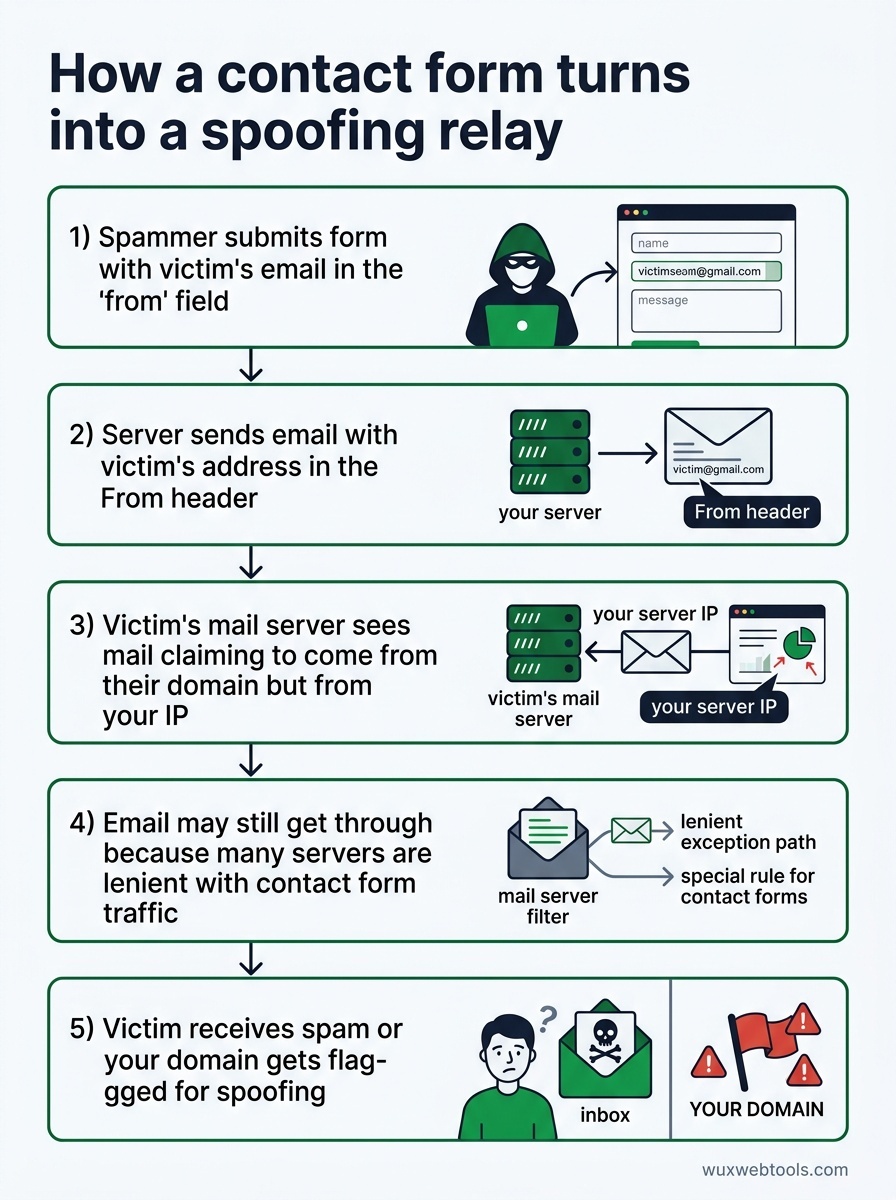
A typical contact form accepts three fields: name, email, and message. The server-side handler takes that email address and drops it directly into the From header of an outgoing SMTP message. This is convenient for replies—you can just hit "reply" in your inbox—but it's also a gift to spammers.
Here's what happens when a spammer finds your form:
- They submit the form with a victim's email address in the "from" field
- Your server dutifully sends an email with that victim's address in the
Fromheader - The victim's mail server sees email claiming to come from their domain, but originating from your IP
- If your domain lacks proper SPF/DKIM/DMARC records (or even if it has them), the email may still get through because many servers are lenient with contact form traffic
- The victim receives spam that appears to come from their own address, or your domain gets flagged for spoofing
This isn't a theoretical attack. It happens constantly. If you run a contact form and you've never checked your mail server logs, you're probably already being used this way.
The correct way to send contact form email
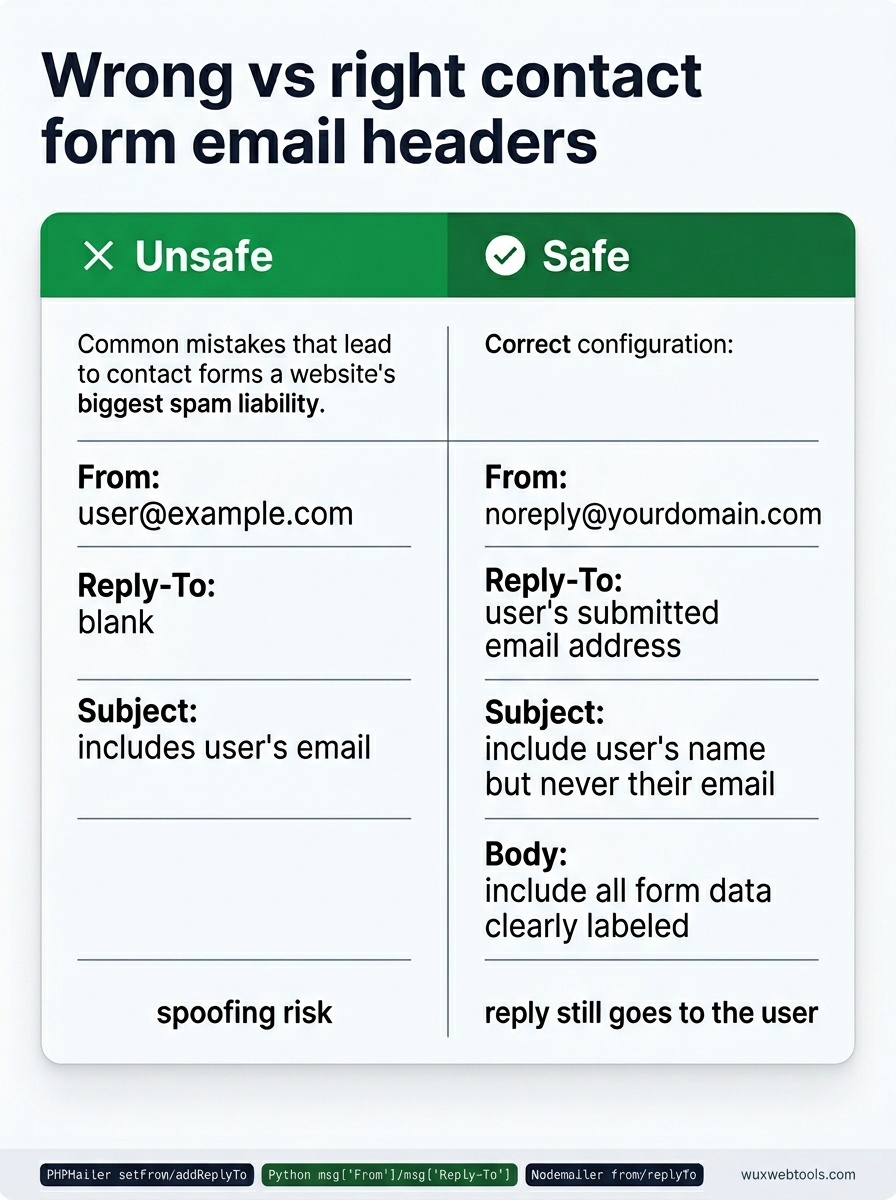
The fix is to never put user input in the From header. Instead:
- From:
[email protected](or any address you control) - Reply-To: The user's submitted email address
- Subject: Include the user's name if you want, but never their email
- Body: Include all form data, clearly labeled
This way, your server only sends email from addresses you own and have properly authenticated. When you hit "reply" in your inbox, it still goes to the user—that's what Reply-To does. But spammers can't use your form to impersonate arbitrary addresses.
Most email libraries support this out of the box. In PHP's PHPMailer:
$mail->setFrom('[email protected]', 'Contact Form');
$mail->addReplyTo($_POST['email'], $_POST['name']);
In Python's smtplib with email.mime:
msg['From'] = '[email protected]'
msg['Reply-To'] = form_data['email']
In Node.js with Nodemailer:
const mailOptions = {
  from: '[email protected]',
  replyTo: req.body.email,
  // ...
};
If your contact form currently puts user input in the From header, this is a one-line fix. Do it today.
Rate limiting is not optional
Even with proper header hygiene, an unprotected contact form is still a spam vector. Spammers will submit your form hundreds of times with different message bodies, and your inbox will fill with garbage.
You need rate limiting at multiple levels:
- Per IP: No more than 5 submissions per hour from the same IP
- Per email: No more than 3 submissions per day from the same email address
- Global: No more than 50 submissions per hour across all users (adjust based on your traffic)
Rate limiting belongs in your application code, not just in your web server config. Nginx and Apache rate limiting can help, but they operate at the request level and don't know about email addresses or form-specific abuse patterns.
If you're using a framework, there's probably a rate-limiting middleware you can drop in. If you're building from scratch, a simple Redis counter with expiring keys works fine:
key = f"contact_form:{ip_address}"
count = redis.incr(key)
if count == 1:
    redis.expire(key, 3600)  # 1 hour
if count > 5:
    return error("Rate limit exceeded")
This isn't bulletproof—spammers can rotate IPs—but it raises the cost of abuse significantly.
CAPTCHAs are a trade-off, not a solution
Google's reCAPTCHA v3 is invisible and scores users based on behavior, which sounds ideal. In practice, it blocks legitimate users more often than you'd expect, especially users on VPNs, Tor, or shared corporate networks.
reCAPTCHA v2 (the "I'm not a robot" checkbox) is more reliable but adds friction. Honeypot fields—hidden form inputs that humans won't fill out but bots will—catch unsophisticated bots with zero user impact, but they're trivial for any serious spammer to bypass.
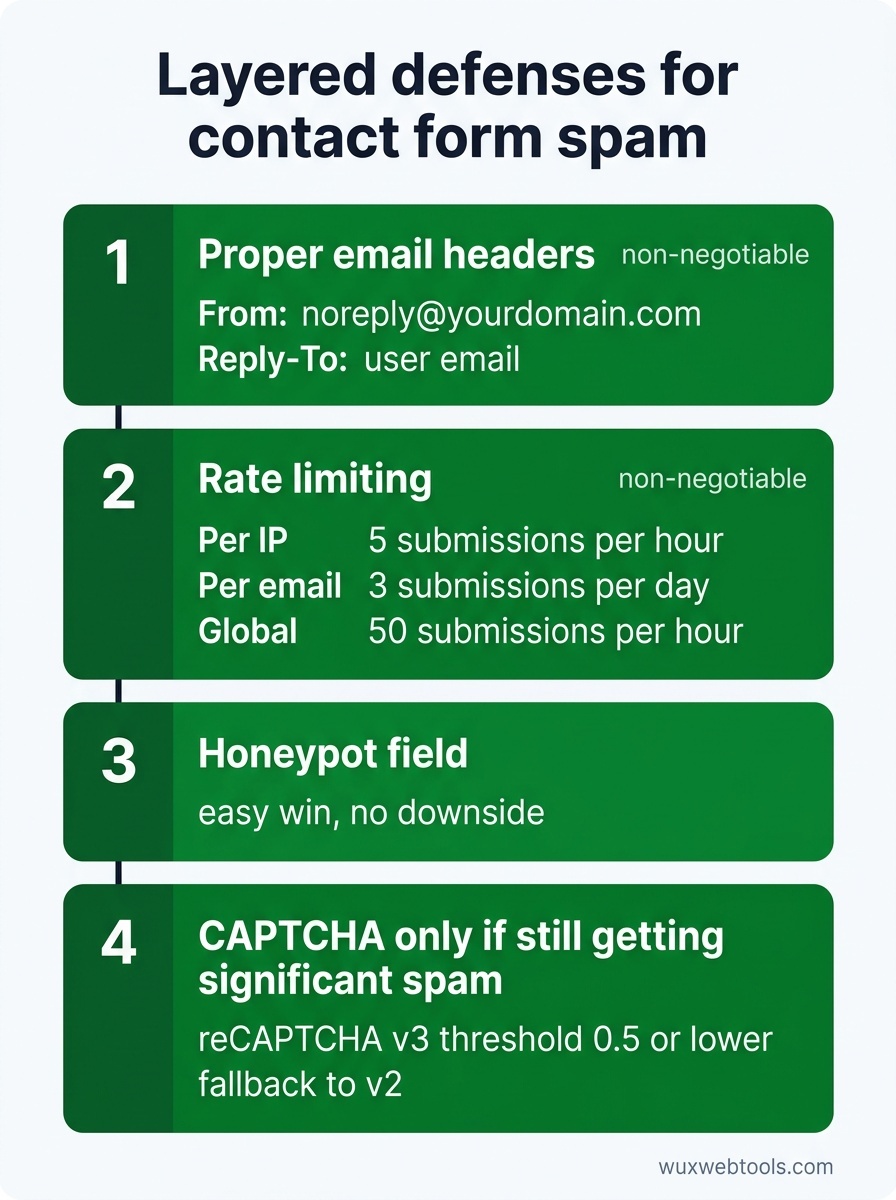
The best approach is layered:
- Proper email headers (non-negotiable)
- Rate limiting (non-negotiable)
- Honeypot field (easy win, no downside)
- CAPTCHA only if you're still getting significant spam after the above
If you do add a CAPTCHA, use reCAPTCHA v3 with a low threshold (0.5 or lower) and a fallback to v2 for users who score poorly. This keeps friction low for most users while still blocking bots.
When to use a third-party form service
If you're running a small site and you don't want to maintain form infrastructure, third-party services like Formspree, Tally, or Netlify Forms handle all of this for you. They rate-limit, validate, and send email from their own domains, so your reputation stays clean.
The trade-off is that you're sending user data to a third party, which may conflict with your privacy policy or GDPR obligations. Processing data client-side is a growing trend for privacy-conscious teams, but contact forms inherently require server-side processing—you can't send email from the browser without exposing credentials.
If you're handling sensitive inquiries (legal, medical, financial), you probably need to run your own form infrastructure. For everything else, a third-party service is a reasonable choice.
The DMARC problem
Even if you fix your contact form headers, you're not safe if your domain lacks a DMARC policy. DMARC tells receiving mail servers what to do with email that fails SPF or DKIM checks. Without it, spammers can still send email that appears to come from your domain, even if they're not using your servers.
Setting up DMARC is outside the scope of this article, but if you're serious about email reputation, it's non-negotiable. Start with a monitoring-only policy (p=none) and gradually move to p=quarantine or p=reject as you verify that your legitimate email is properly authenticated.
What about Cookie consent and form tracking?
If your contact form uses analytics or marketing pixels to track submissions, you're probably subject to GDPR and ePrivacy rules. Most contact forms don't need tracking—you already know someone submitted the form because you received the email—but if you're using something like Facebook Pixel or Google Analytics events, you need explicit consent before those scripts load.
The simplest approach is to not track contact form submissions at all. If you must track them, load tracking scripts only after the user consents, and make sure your consent banner is compliant.
Key takeaways
- Never put user-submitted email addresses in the
Fromheader. UseReply-Toinstead. - Rate limiting is mandatory. Implement it at the application level, not just the web server.
- Honeypot fields are a free win. CAPTCHAs should be a last resort.
- Third-party form services are a reasonable choice for small sites, but they introduce privacy trade-offs.
- If you send any email from your domain, you need a DMARC policy.
FAQ
Q: Can I just disable the contact form and use a mailto link instead?
A: You can, but mailto links expose your email address to scrapers, and you lose the ability to collect structured data. If spam is overwhelming, a mailto link is better than a broken contact form, but fixing the form is better than both.
Q: What if I need to send email from the user's address for legitimate reasons?
A: You almost certainly don't. If you think you do, you're probably trying to solve a workflow problem (like reply routing) that Reply-To already solves. If you genuinely need to send email from arbitrary addresses, you need a dedicated email service with proper authentication, not a contact form.
Q: How do I know if my contact form is already being abused?
A: Check your mail server logs for outgoing SMTP connections. If you see a high volume of outgoing email to addresses you don't recognize, or if your domain has been flagged by spam databases like Spamhaus, you're probably being used as a relay. Tools like MXToolbox can check your domain's reputation.
Q: Is it safe to use a free CAPTCHA service?
A: Google's reCAPTCHA is free and widely used, but it sends user data to Google, which may conflict with your privacy policy. hCaptcha is a privacy-focused alternative that doesn't train AI models on your users. Cloudflare Turnstile is another option that's less intrusive than traditional CAPTCHAs.
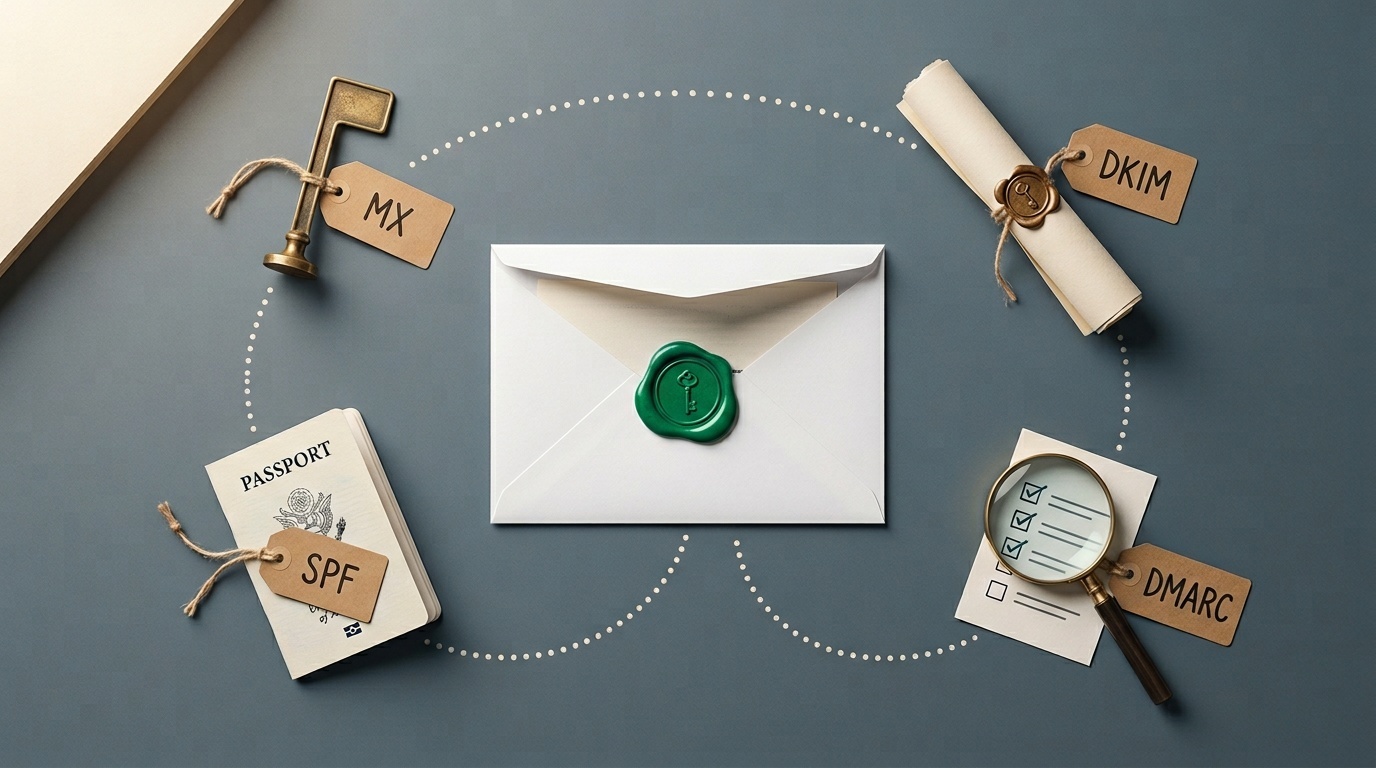
Q: What's the difference between SPF, DKIM, and DMARC?
A: SPF lists which mail servers are allowed to send email from your domain. DKIM cryptographically signs outgoing email so recipients can verify it wasn't tampered with. DMARC ties them together and tells recipients what to do if an email fails SPF or DKIM checks. You need all three for proper email authentication.
Sources
- OWASP: Email Header Injection — Detailed explanation of how contact forms can be exploited for email spoofing.
- RFC 5322: Internet Message Format — The technical standard that defines email headers, including
FromandReply-To. - DMARC.org: Overview — Official resource for understanding and implementing DMARC policies.
- Spamhaus: Domain Blocklists — Check if your domain has been flagged for spam and understand how blocklists work.
Frequently asked questions
Can I just disable the contact form and use a mailto link instead?
What if I need to send email from the user's address for legitimate reasons?
How do I know if my contact form is already being abused?
Is it safe to use a free CAPTCHA service?
What's the difference between SPF, DKIM, and DMARC?
Sources & further reading