Stop guessing your DNS: a developer-friendly tour of MX, SPF, DKIM and DMARC
Email authentication records are cryptic, but they're not magic. Here's what each one actually does and how to configure them without breaking delivery.

Table of contents
- Why email DNS records matter now
- MX records: where inbound email goes
- SPF: which servers are allowed to send as you
- DKIM: cryptographic proof of sender identity
- DMARC: policy enforcement and reporting
- How to audit your current setup
- When to use subdomain policies
- What to do when authentication breaks
- Key takeaways
- FAQ
- Sources
Why email DNS records matter now
Email authentication used to be optional. In 2026, it's table stakes. Gmail and Outlook both enforce SPF and DKIM for bulk senders, and DMARC is rapidly becoming mandatory for any domain that sends transactional email. If your DNS records are wrong, your emails don't arrive—no bounce, no warning, just silence.
The problem is that these records are documented like RFCs, not like tools. Most developers copy-paste examples from their email provider's setup guide and hope for the best. That works until you need to troubleshoot, add a second sending service, or explain to a client why their contact form emails are landing in spam.
This guide walks through MX, SPF, DKIM and DMARC in the order you'll actually encounter them, with enough detail to configure them correctly and enough context to debug them when they break.
MX records: where inbound email goes
MX records tell the internet which mail servers accept email for your domain. They're the simplest of the four, but also the easiest to misconfigure.
An MX record has two parts: a priority number and a hostname. Lower priority numbers are tried first. If you use Google Workspace, your MX records might look like this:
example.com.  MX  1  aspmx.l.google.com.
example.com.  MX  5  alt1.aspmx.l.google.com.
example.com.  MX  5  alt2.aspmx.l.google.com.
The trailing dots matter—they signal that the hostname is fully qualified. Most DNS providers add them automatically, but not all.
Common mistakes: pointing MX records at an A record instead of a hostname, setting all priorities to the same number (which defeats the purpose of having backups), or forgetting to remove old MX records when you migrate providers. Stale MX records don't just sit there harmlessly—they can cause mail loops or split delivery across two inboxes.
If you're running your own contact form and want to avoid spam without relying on third-party services, understanding how forms become spam vectors is a useful starting point.
SPF: which servers are allowed to send as you
SPF (Sender Policy Framework) is a TXT record that lists the IP addresses and domains authorized to send email on behalf of your domain. It's the first check most mail servers perform when they receive a message claiming to be from you.
A basic SPF record looks like this:
v=spf1 include:_spf.google.com ~allBreaking it down:
v=spf1declares the SPF versioninclude:_spf.google.comdelegates to Google's SPF record~allis a soft fail—reject mail from unlisted sources, but don't be too strict
You can also use ip4: or ip6: to whitelist specific addresses, or a and mx to reference your domain's A and MX records. The all mechanism at the end controls what happens to mail from sources you didn't list: -all is a hard fail (reject), ~all is soft fail (mark as suspicious), ?all is neutral (no opinion), and +all is a free-for-all (don't use this).
SPF has two sharp edges. First, it breaks when email is forwarded, because the forwarding server isn't in your SPF record. Second, SPF records have a lookup limit of ten DNS queries. If you include too many third-party services, you'll exceed the limit and SPF will stop working. The fix is to flatten your SPF record—replace include: directives with the actual IP ranges—but this requires maintenance when providers change their IPs.
DKIM: cryptographic proof of sender identity
DKIM (DomainKeys Identified Mail) adds a digital signature to your outbound email. The receiving server checks the signature against a public key published in your DNS. If the signature is valid and the message hasn't been tampered with, DKIM passes.
Unlike SPF, DKIM survives forwarding, because the signature travels with the message. It's also more flexible—you can have multiple DKIM keys for different sending services, each with its own selector.
A DKIM DNS record looks like this:
default._domainkey.example.com. TXT "v=DKIM1; k=rsa; p=MIGfMA0GCSqGSIb3DQEBAQUAA4GNADCBiQKBgQC..."The selector (default in this example) is arbitrary—your email provider chooses it. The p= value is the public key, usually a long base64-encoded string. Your email provider generates the private key and uses it to sign outgoing messages.
DKIM setup is almost always handled by your email provider. Your job is to copy the TXT record they give you and paste it into your DNS. The tricky part is that some DNS providers don't handle long TXT records well—they either truncate them or require you to split the value into multiple quoted strings.
To verify DKIM is working, send a test email to a Gmail address and check the headers. Look for dkim=pass in the Authentication-Results header.
DMARC: policy enforcement and reporting
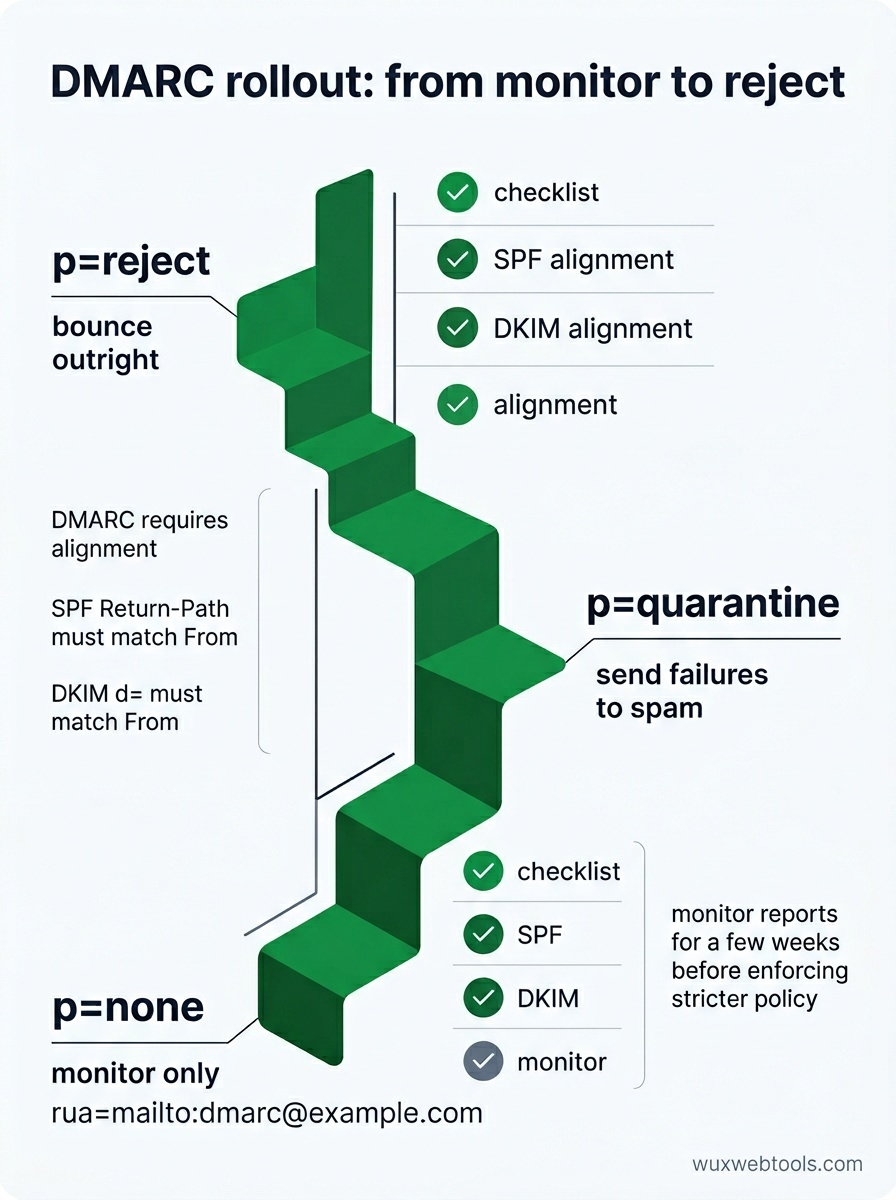
DMARC (Domain-based Message Authentication, Reporting and Conformance) ties SPF and DKIM together and tells receiving servers what to do when authentication fails. It also enables reporting, so you can see who's sending email as your domain—both legitimate and spoofed.
A minimal DMARC record looks like this:
_dmarc.example.com. TXT "v=DMARC1; p=none; rua=mailto:[email protected]"p=nonemeans monitor only—don't reject or quarantine failed messagesrua=mailto:[email protected]specifies where to send aggregate reports
Once you're confident SPF and DKIM are working, you can tighten the policy to p=quarantine (send failures to spam) or p=reject (bounce them outright). You can also set a subdomain policy with sp= and specify a percentage of messages to apply the policy to with pct=.
DMARC reports are XML files sent daily by major receivers. They're verbose and hard to read raw, but they tell you exactly which messages passed or failed authentication and why. If you're seeing legitimate mail rejected, the reports will show you which SPF or DKIM check is failing.
One gotcha: DMARC requires alignment. For SPF, the domain in the Return-Path header must match the domain in the From header (or be a subdomain). For DKIM, the d= domain in the DKIM signature must match the From domain. If you're using a third-party sending service, they need to support custom return paths or DKIM signing with your domain, not theirs.
How to audit your current setup
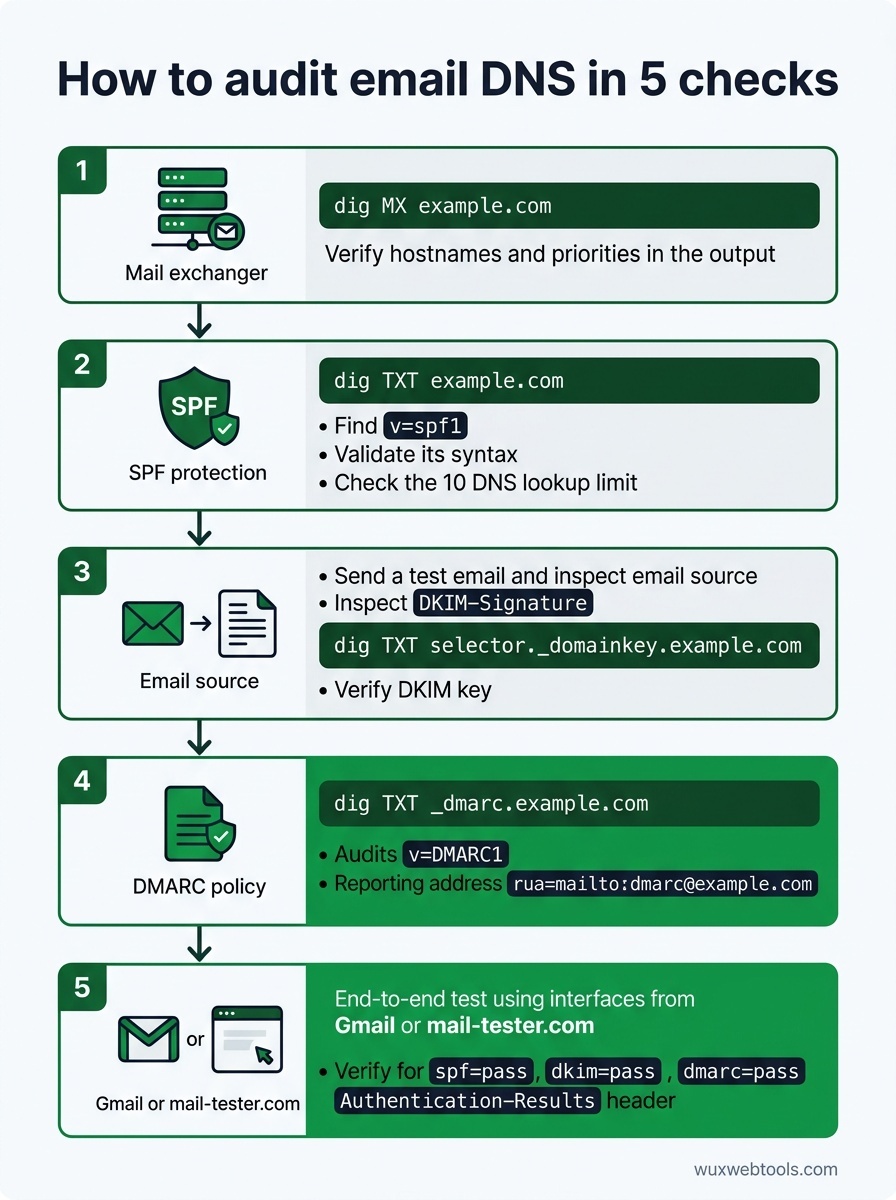
Most DNS issues are invisible until they cause a problem. Here's how to check your records before something breaks:
- Query your MX records:
dig MX example.comshould return your mail server hostnames and priorities. Verify they match your email provider's documentation.
- Check SPF syntax:
dig TXT example.comand look for thev=spf1record. Run it through an SPF validator to catch syntax errors and lookup limit violations.
- Verify DKIM keys: Send a test email and inspect the
DKIM-Signatureheader. Extract the selector and domain, then querydig TXT selector._domainkey.example.comto confirm the public key exists.
- Validate DMARC policy:
dig TXT _dmarc.example.comshould return your DMARC record. Make surerua=points to an address you actually monitor.
- Test end-to-end: Use a service like mail-tester.com or send to a Gmail address and check the full headers. Look for
spf=pass,dkim=pass, anddmarc=passin theAuthentication-Resultsheader.
If you're debugging why emails aren't arriving, the headers are your best tool. Most mail clients let you view raw headers—in Gmail, open the message, click the three dots, and select 'Show original'. The Authentication-Results header will tell you exactly which check failed and why.
When to use subdomain policies
If you send email from multiple subdomains—say, newsletter.example.com for marketing and app.example.com for transactional mail—you can set per-subdomain DMARC policies. This lets you enforce strict policies on subdomains you control while keeping a looser policy on your main domain.
The trade-off is complexity. Each subdomain needs its own SPF, DKIM, and DMARC records, and you need to track which sending services are authorized for which subdomains. For most small teams, a single well-configured domain is simpler and just as secure.
What to do when authentication breaks
The most common failure mode is adding a new sending service without updating DNS. If you start using a new transactional email provider, you need to add their SPF include or IP range, configure DKIM signing with your domain, and verify DMARC alignment.
The second most common issue is forwarding. If users forward your email to another address, SPF will fail because the forwarding server isn't in your SPF record. DKIM usually survives forwarding, so as long as DKIM passes and your DMARC policy allows partial alignment, the message should still be delivered. If you're seeing forwarded mail rejected, check your DMARC policy—p=reject with strict alignment will break forwarding.
The third issue is DNS propagation. Changes to DNS records can take hours to propagate, and different mail servers cache records for different lengths of time. If you've just updated a record and it's not working, wait a few hours and test again. You can check propagation with a tool like whatsmydns.net.
Key takeaways
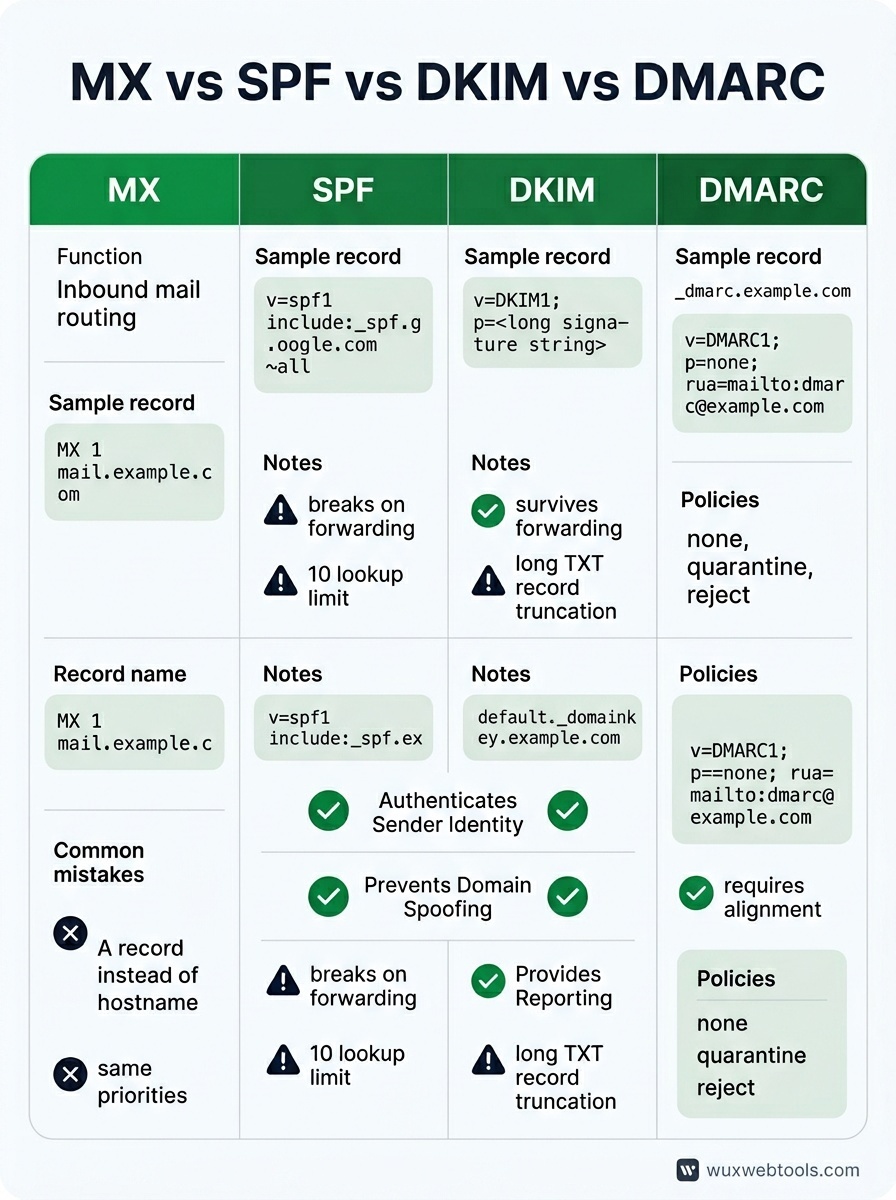
- MX records route inbound mail; SPF, DKIM and DMARC authenticate outbound mail. They solve different problems and you need all four.
- SPF breaks on forwarding and has a ten-lookup limit. DKIM survives forwarding but requires per-service configuration. DMARC ties them together and enables reporting.
- Start with
p=nonein DMARC, monitor the reports for a few weeks, then tighten top=quarantineorp=rejectonce you're confident legitimate mail is passing. - DNS errors are silent. Test your configuration with real email and inspect the headers to confirm SPF, DKIM and DMARC are passing.
- If authentication breaks after adding a new sending service, check SPF includes, DKIM selectors, and DMARC alignment. The headers will tell you which check failed.
FAQ
Q: Can I have multiple SPF records?
A: No. Multiple SPF records will cause all of them to be ignored. If you need to authorize multiple services, use include: directives within a single SPF record, or list IP ranges directly. Watch the ten-lookup limit.
Q: Do I need DMARC if I'm only sending a few emails a day?
A: Yes. DMARC isn't about volume—it's about proving you are who you say you are. Even small domains benefit from DMARC because it prevents spoofing and gives you visibility into delivery issues. Start with p=none and a reporting address.
Q: What happens if DKIM and SPF both fail but the email looks legitimate?
A: It depends on your DMARC policy. If p=none, the mail is delivered with a warning. If p=quarantine, it goes to spam. If p=reject, it's bounced. This is why you should monitor DMARC reports before enforcing a strict policy—you might have legitimate senders you didn't know about.
Q: Can I use the same DKIM key for multiple domains?
A: Technically yes, but don't. Each domain should have its own DKIM key pair. Sharing keys makes rotation harder and increases the blast radius if a private key is compromised.
Q: How often should I rotate DKIM keys?
A: There's no universal rule, but once a year is reasonable for most domains. If you suspect a key has been compromised, rotate immediately. Make sure to publish the new public key in DNS before you start signing with the new private key, and leave the old key in DNS for a few days after rotation to handle delayed mail.
<!-- tool-cta:start -->
💡 Try this: Inspect any domain's published policy with the DMARC Lookup to see how MX, SPF and DMARC records fit together in practice.
<!-- tool-cta:end -->
Sources
- RFC 7208: Sender Policy Framework (SPF) — The SPF specification, including syntax rules and the ten-lookup limit.
- RFC 6376: DomainKeys Identified Mail (DKIM) — The DKIM specification, covering signature generation and verification.
- RFC 7489: Domain-based Message Authentication, Reporting, and Conformance (DMARC) — The DMARC specification, including policy syntax and aggregate reporting format.
- Google Workspace: Prevent spoofing and spam — Practical guidance on SPF, DKIM and DMARC configuration for Google Workspace domains.
Frequently asked questions
Can I have multiple SPF records?
Do I need DMARC if I'm only sending a few emails a day?
What happens if DKIM and SPF both fail but the email looks legitimate?
Can I use the same DKIM key for multiple domains?
How often should I rotate DKIM keys?
Sources & further reading