Image formats in 2026: when AVIF beats WebP and when it does not
AVIF is smaller and sharper than WebP in most cases, but encoding speed and browser support still matter. Here's when to use each.

Table of contents
The state of image formats in 2026
AVIF has been "the future" for long enough that it now feels like the present. Browser support crossed 95% global coverage in late 2024, CDNs added automatic AVIF transcoding, and most image optimization tools now ship AVIF by default. WebP, meanwhile, has become the safe fallback—ubiquitous, fast to encode, and good enough for most use cases.
The question is no longer whether AVIF is better in theory. It is. The question is whether the practical trade-offs—encoding time, tooling maturity, edge case behavior—make it worth the switch for your specific workload.
This article walks through the decision tree. If you serve thousands of user-uploaded images, the answer is different than if you hand-tune a dozen marketing hero shots. If you care about encoding speed, the answer changes again.
Where AVIF wins decisively
AVIF uses the AV1 video codec's intra-frame compression, which means it benefits from years of optimization for motion video. The result is consistently smaller file sizes than WebP at equivalent perceptual quality, especially for photographic content.
In repeated tests across diverse image sets, AVIF files are 20-30% smaller than WebP at the same SSIM score. For high-resolution photos—product shots, editorial images, anything above 1200px wide—that difference compounds quickly. A 2MB WebP becomes a 1.4MB AVIF. Multiply that across a hundred images on a page and the bandwidth savings are material.
AVIF also handles smooth gradients and low-contrast areas better than WebP. WebP's VP8 heritage means it can introduce banding in skies, shadows, and other subtle tonal shifts. AVIF's more sophisticated transform coding avoids this. If your images include a lot of gradients—design work, illustrations, sunsets—AVIF will look cleaner at smaller file sizes.
Browser support is now strong enough that AVIF can be the primary format for most sites. Safari added support in 16.4 (March 2023), which was the last major holdout. Global support is above 95% as of early 2026. The remaining gap is older Android devices and legacy enterprise browsers, which is why you still need a fallback.
Where WebP still makes sense
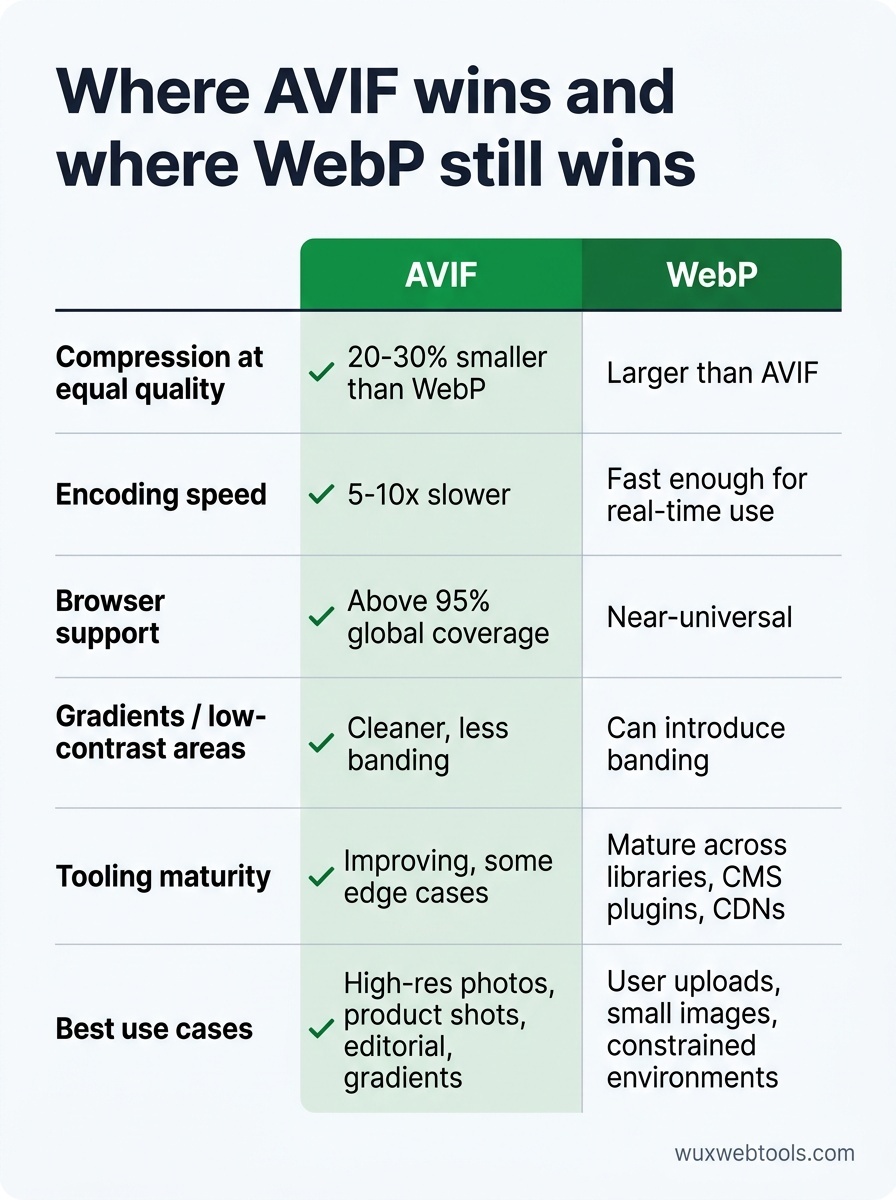
Encoding speed is the biggest practical constraint. AVIF encoding is 5-10x slower than WebP, depending on quality settings and encoder implementation. For user-generated content—profile photos, forum attachments, anything uploaded in real time—that latency matters. A WebP encode that takes 200ms becomes a 2-second AVIF encode. If you're processing uploads synchronously, that's a user-facing delay.
The solution is either to encode asynchronously (upload the original, serve a placeholder, encode in the background) or to stick with WebP for user-generated content and reserve AVIF for curated assets you control. Many sites do both: AVIF for marketing images, WebP for user uploads.
WebP also has better tooling maturity. Every image library, CMS plugin, and CDN has supported WebP for years. AVIF support is catching up, but edge cases still exist. Some older ImageMagick builds produce poor-quality AVIF output. Some CDNs charge extra for AVIF transcoding. If you're working in a constrained environment—legacy CMS, limited budget, tight deadlines—WebP is the path of least resistance.
Finally, WebP is still smaller than JPEG in almost every case, and encoding is fast enough for real-time use. If your current baseline is JPEG and you haven't migrated to modern formats yet, WebP is the safer first step. You can always add AVIF later as a progressive enhancement.
The practical decision tree
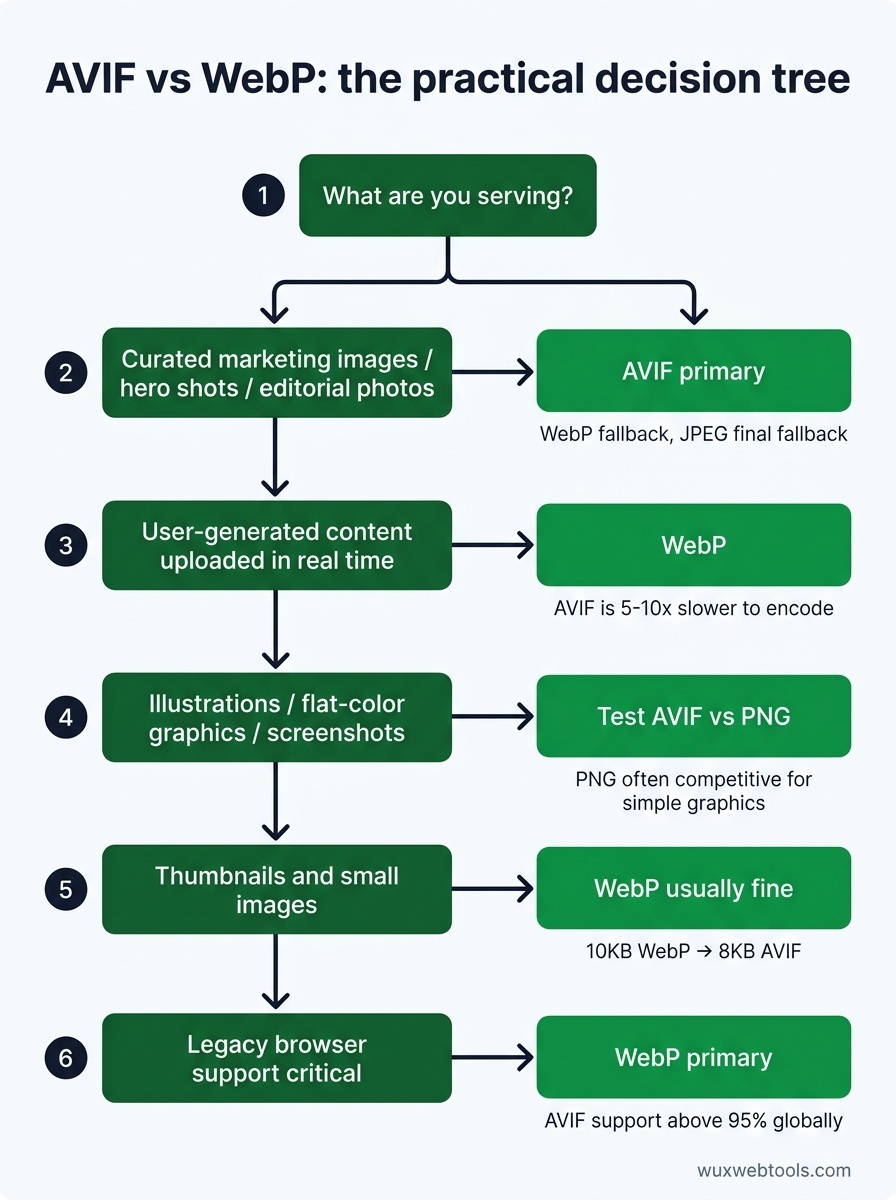
Here's how to choose:
- Curated marketing images, hero shots, editorial photos: Use AVIF as the primary format, with WebP as the first fallback and JPEG as the final fallback. The file size savings justify the encoding cost, and you control the pipeline.
- User-generated content uploaded in real time: Use WebP. Encoding speed matters more than the last 20% of compression efficiency, and you can't afford multi-second delays.
- Illustrations, flat-color graphics, screenshots: AVIF is better than WebP, but PNG is often competitive for simple graphics with large flat areas. Test both. If your PNG is already small and compresses well, the format migration may not be worth it.
- Thumbnails and small images: WebP is usually fine. The absolute byte savings from AVIF are small (a 10KB WebP becomes an 8KB AVIF), and encoding speed matters more at scale.
- Legacy browser support is critical: Stick with WebP as the primary modern format. AVIF's 95% coverage is excellent, but if you serve a user base with older devices or enterprise environments, WebP's near-universal support is safer.
If you're unsure, the safest pattern is to serve AVIF to browsers that support it, with a WebP fallback and a JPEG final fallback. The <picture> element makes this straightforward:
<picture>
  <source srcset="image.avif" type="image/avif">
  <source srcset="image.webp" type="image/webp">
  <img src="image.jpg" alt="Description">
</picture>
This approach gives you the best of both worlds: maximum compression for modern browsers, safe fallbacks for older ones.
Encoding settings that matter
If you do adopt AVIF, encoding settings have a bigger impact on output quality than they do with WebP. AVIF's flexibility means there are more ways to produce a bad result.
The two settings that matter most are quality and speed. Quality is straightforward: higher numbers mean better-looking images and larger files. For AVIF, a quality setting of 75-85 is usually the sweet spot for photographic content. Below 70, you start to see noticeable artifacts. Above 90, file sizes balloon without meaningful quality gains.
Speed controls how much time the encoder spends optimizing the output. Slower encoding produces smaller files, but the returns diminish quickly. Most encoders use a scale of 0-10, where 0 is slowest and 10 is fastest. A speed setting of 6-8 is a good compromise: encoding is fast enough for batch processing, and file sizes are within 10-15% of the theoretical minimum.
If you're encoding AVIF on the server, use a recent version of libavif or avifenc. Older encoders (pre-2024) produce noticeably worse output at the same file size. The format is still maturing, and encoder improvements have been significant.
What about JPEG XL?
JPEG XL is technically superior to both AVIF and WebP. It compresses better, encodes faster, supports lossless compression, and handles a wider range of image types. It's also a dead format.
Google removed JPEG XL support from Chrome in 2022, citing low adoption and complexity. Apple never added support. As of 2026, JPEG XL is supported only in Firefox and Safari Technology Preview, which means it's not viable for production use. Unless browser vendors reverse course—unlikely—JPEG XL will remain a format for enthusiasts and archival workflows, not the web.
The migration path
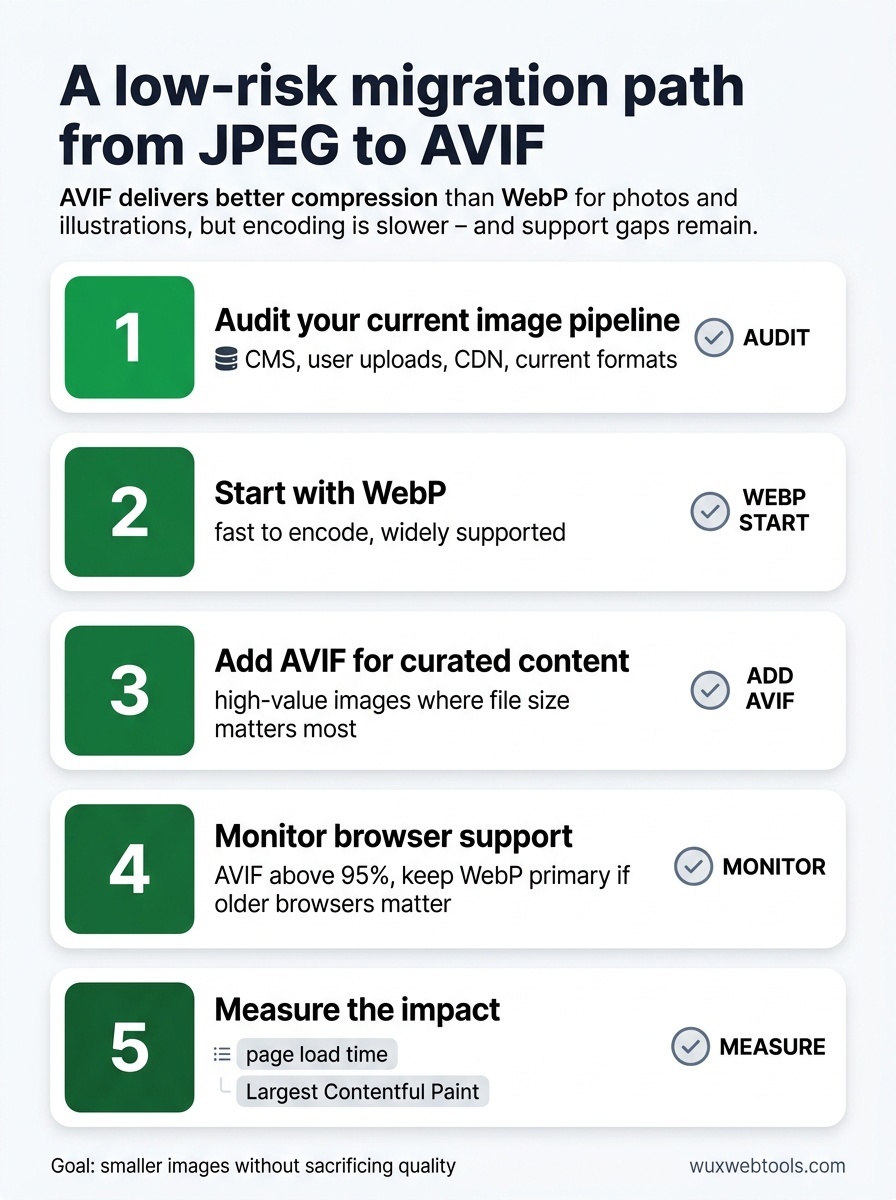
If you're moving from JPEG to modern formats, the safest path is:
- Audit your current image pipeline. Identify where images come from (CMS, user uploads, CDN), how they're processed, and what formats you currently serve. Why processing images in the browser is a privacy win covers some of the trade-offs around where image processing happens.
- Start with WebP. It's fast to encode, widely supported, and delivers immediate file size reductions. This is the low-risk first step.
- Add AVIF for curated content. Once WebP is working reliably, add AVIF for high-value images where file size matters most. Test encoding times and make sure your CDN or image service supports it.
- Monitor browser support. AVIF coverage is excellent now, but if your analytics show a meaningful percentage of users on older browsers, keep WebP as the primary format.
- Measure the impact. Use real user monitoring to track page load times and Largest Contentful Paint before and after the migration. How to read a Lighthouse report without panicking is a useful guide for interpreting performance metrics.
The goal is not to use the newest format because it's new. The goal is to serve smaller images without sacrificing quality, which improves page speed and reduces bandwidth costs. AVIF does that better than WebP in most cases, but the practical constraints—encoding speed, tooling, browser support—mean WebP is still the right choice for some workloads.
Key takeaways
- AVIF is 20-30% smaller than WebP at equivalent quality, especially for photographic content and images with gradients.
- Encoding AVIF is 5-10x slower than WebP, which makes it impractical for real-time user uploads unless you encode asynchronously.
- Browser support for AVIF is above 95% globally, but WebP's near-universal support makes it the safer fallback.
- For curated marketing images, use AVIF as the primary format with WebP and JPEG fallbacks. For user-generated content, stick with WebP.
- JPEG XL is technically superior but has no viable browser support and should not be used for production websites.
FAQ
Q: Can I serve AVIF without a fallback?
A: Not yet. AVIF support is above 95%, but that still leaves millions of users on older browsers. Always include a WebP or JPEG fallback using the <picture> element. The browser will automatically select the best format it supports.
Q: Does AVIF support transparency?
A: Yes. AVIF supports an alpha channel, which makes it a viable replacement for PNG in cases where you need transparency. File sizes are usually smaller than PNG, though encoding is slower.
Q: Should I re-encode all my existing images to AVIF?
A: Only if the bandwidth savings justify the effort. Start with high-traffic pages and large images where the impact is most visible. For low-traffic pages or small images, the ROI is minimal. Focus on new content first, then backfill selectively.
Q: What's the best tool for batch-encoding AVIF?
A: avifenc (part of libavif) is the most widely used command-line tool. For GUI tools, Squoosh (web-based) and ImageOptim (Mac) both support AVIF. Most modern CDNs and image services (Cloudflare, Cloudinary, imgix) can transcode to AVIF automatically.
Q: Does AVIF work with responsive images and srcset?
A: Yes. Use the <picture> element with multiple <source> elements for format fallbacks, and srcset within each <source> for responsive sizing. The browser will pick the best format and size based on support and viewport width.
<!-- tool-cta:start -->
💡 Try this: Compare the two formats on your own assets with the Image Converter, which can output both AVIF and WebP so you can measure real-world size and quality.
<!-- tool-cta:end -->
Sources
- AVIF vs WebP: A Comprehensive Comparison — Detailed analysis of compression efficiency and quality settings across different image types.
- Can I use AVIF? — Current browser support data for AVIF image format.
- libavif GitHub repository — Reference encoder implementation and documentation for AVIF.
- Web Almanac: Images — Annual report on image format adoption and performance across the web.
Frequently asked questions
Can I serve AVIF without a fallback?
Does AVIF support transparency?
Should I re-encode all my existing images to AVIF?
What's the best tool for batch-encoding AVIF?
Does AVIF work with responsive images and srcset?
Sources & further reading