प्रोडक्शन में redirects और HTTP headers debug करने के लिए एक छोटा toolkit
पाँच command-line tools और browser techniques जो दिखाती हैं कि client और server के बीच वास्तव में क्या हो रहा है
सामग्री की तालिका
प्रोडक्शन में HTTP debug करने की समस्या
ज़्यादातर HTTP समस्याएँ browser में दिखाई नहीं देतीं। कोई redirect chain चुपचाप fail हो जाती है, कोई cache header एक character से गलत होता है, कोई CORS policy बिना स्पष्टीकरण के request block कर देती है। Browser के developer tools आपको conversation का result दिखाते हैं, लेकिन वे अक्सर वह raw exchange छिपा देते हैं जिसकी वजह से समस्या हुई।
यह बात production में सबसे ज़्यादा महत्वपूर्ण होती है, जहाँ आप क्या बदला है यह देखने के लिए logging जोड़ नहीं सकते या services restart नहीं कर सकते। आपको ऐसे tools चाहिए जो वास्तविक HTTP conversation दिखाएँ: request headers, response headers, status codes, redirect targets, timing। यहाँ वे पाँच tools हैं जो यह काम भरोसेमंद तरीके से करते हैं, और साथ में वे browser techniques भी हैं जो उन्हें complement करती हैं।
curl: आधार
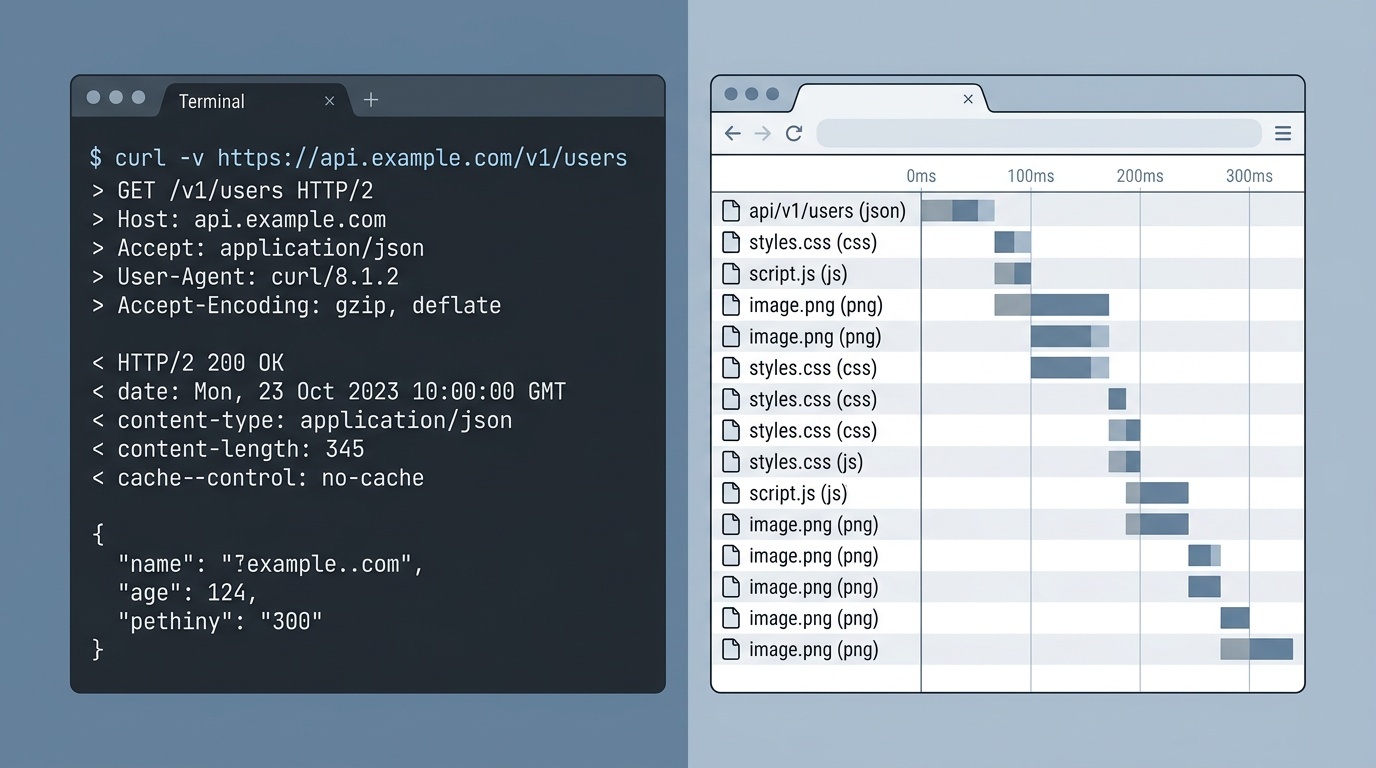
curl सबसे पहले इस्तेमाल करने वाला tool है, क्योंकि यह आपको ठीक वही दिखाता है जो server ने भेजा, बीच में browser interpretation के बिना।
Body के बिना response headers देखने के लिए:
curl -I https://example.comRedirects follow करने और हर step देखने के लिए:
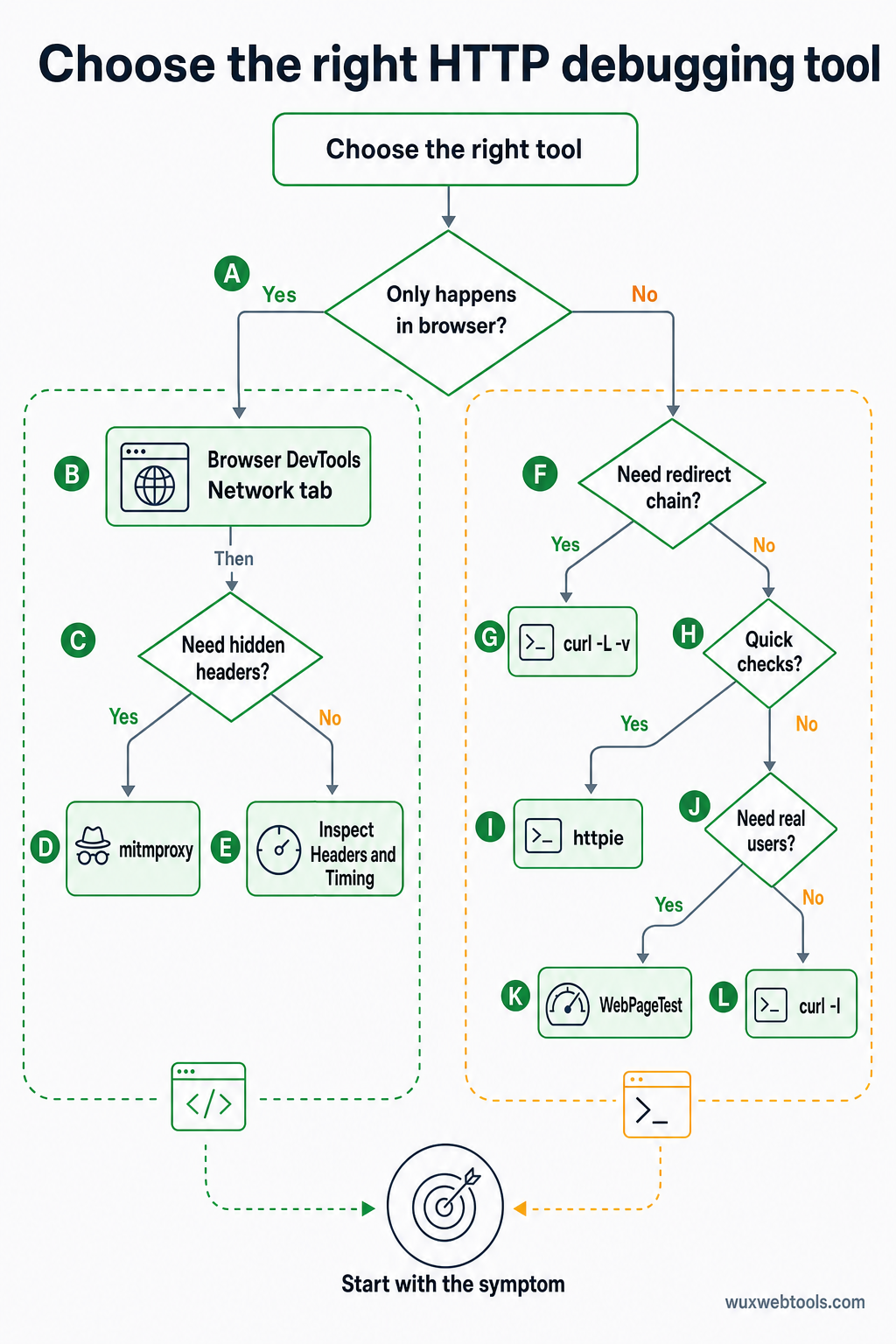
curl -L -v https://example.com-v flag (verbose) पूरा request और response दिखाता है, सभी headers सहित। -L flag redirects को automatically follow करता है। साथ मिलकर, ये आपको पूरी redirect chain दिखाते हैं, और production की ज़्यादातर समस्याएँ यहीं होती हैं।
केवल redirect locations देखने के लिए:
curl -s -o /dev/null -w "%{http_code} %{redirect_url}\n" -L https://example.comयह तब उपयोगी है जब आपको full headers के शोर के बिना redirect chain verify करनी हो। -w flag output को इस तरह format करता है कि केवल status code और chain में अगला URL दिखे।
curl आपको custom headers भेजने भी देता है, जो CDN behavior, authentication, या API endpoints test करने के लिए आवश्यक है:
curl -H "Authorization: Bearer token" -H "Accept: application/json" https://api.example.comhttpie: बेहतर defaults वाला curl
httpie एक Python tool है जो वही करता है जो curl करता है, लेकिन इसकी syntax याद रखना आसान है और output पढ़ना आसान है। यह replacement नहीं है—curl ज़्यादा powerful है और ज़्यादा व्यापक रूप से installed होता है—लेकिन quick checks के लिए httpie तेज़ है।
Headers देखने के लिए:
http HEAD https://example.comRedirects follow करने के लिए:
http --follow --all https://example.com--all flag redirect chain में हर response दिखाता है, केवल final response नहीं। यह curl -L -v के equivalent है, लेकिन output color-coded होता है और scan करना आसान होता है।
JSON भेजने के लिए:
http POST https://api.example.com name=valuehttpie default रूप से JSON मानता है, जिससे APIs test करते समय typing बचती है। यह response को pretty-print भी करता है, जिससे malformed headers या unexpected values पहचानना आसान हो जाता है।
Browser DevTools: Network tab
यदि समस्या केवल browser में होती है, तो browser का Network tab वह जगह है जहाँ से आपको शुरुआत करनी चाहिए। यह आपको curl जैसी ही जानकारी दिखाता है, लेकिन साथ ही browser की interpretation भी दिखाता है: उसने कोई request block की या नहीं, caching कैसे handle की, cookies भेजीं या नहीं।
पूरा request और response headers देखने के लिए, Network tab में किसी भी request पर click करें, फिर Headers section देखें। "Raw" view headers को ठीक वैसे दिखाता है जैसे वे भेजे गए थे, बिना formatting के।
Redirect chains देखने के लिए, 3xx status codes वाली requests खोजें। Browser उन्हें final request के नीचे group करता है, लेकिन आप उन्हें expand करके हर step देख सकते हैं। यहीं आपको redirect loops, missing Location headers, या गलत domain की ओर point करने वाले redirects मिलेंगे।
Timing देखने के लिए, किसी भी request का Timing tab देखें। यह दिखाता है कि browser ने DNS lookup, TCP connection, TLS handshake, और server का इंतज़ार करने में कितना समय लगाया। यदि कोई redirect slow है, तो timing tab बताता है कि समस्या network latency है या server processing।
एक limitation: browser security reasons से कुछ headers छिपा देता है। Set-Cookie headers visible होते हैं, लेकिन actual cookie values redacted होते हैं। Authorization headers कभी-कभी पूरी तरह hidden होते हैं। यदि आपको वे देखने हैं, तो curl इस्तेमाल करें।
mitmproxy: intercepting proxy
mitmproxy एक Python tool है जो आपके browser और server के बीच बैठता है, और हर request और response को real time में दिखाता है। यह curl से ज़्यादा complex है, लेकिन यह अकेला tool है जो दिखाता है कि browser वास्तव में क्या भेजता है, उन headers सहित जिन्हें browser automatically जोड़ता है।
इसे start करने के लिए:
mitmproxyफिर अपने browser को HTTP proxy के रूप में localhost:8080 use करने के लिए configure करें। mitmproxy terminal interface में आपको हर request दिखाएगा। आप headers inspect कर सकते हैं, requests भेजे जाने से पहले edit कर सकते हैं, या requests को अलग parameters के साथ replay कर सकते हैं।
यह उन समस्याओं को debug करने के लिए उपयोगी है जो केवल browser में होती हैं: CORS preflight requests, cookie handling, या वे requests जो certain headers present होने पर fail होती हैं। यह यह test करने के लिए भी उपयोगी है कि आपकी site corporate proxy या VPN के पीछे कैसे behave करती है, क्योंकि mitmproxy ऐसे environments simulate कर सकता है।
Downside setup complexity है। आपको एक root certificate install करना पड़ता है ताकि mitmproxy HTTPS traffic intercept कर सके, और आपको अपने browser को proxy use करने के लिए configure करना पड़ता है। Quick checks के लिए curl तेज़ है। Deep debugging के लिए mitmproxy setup time के लायक है।
webpagetest: production perspective
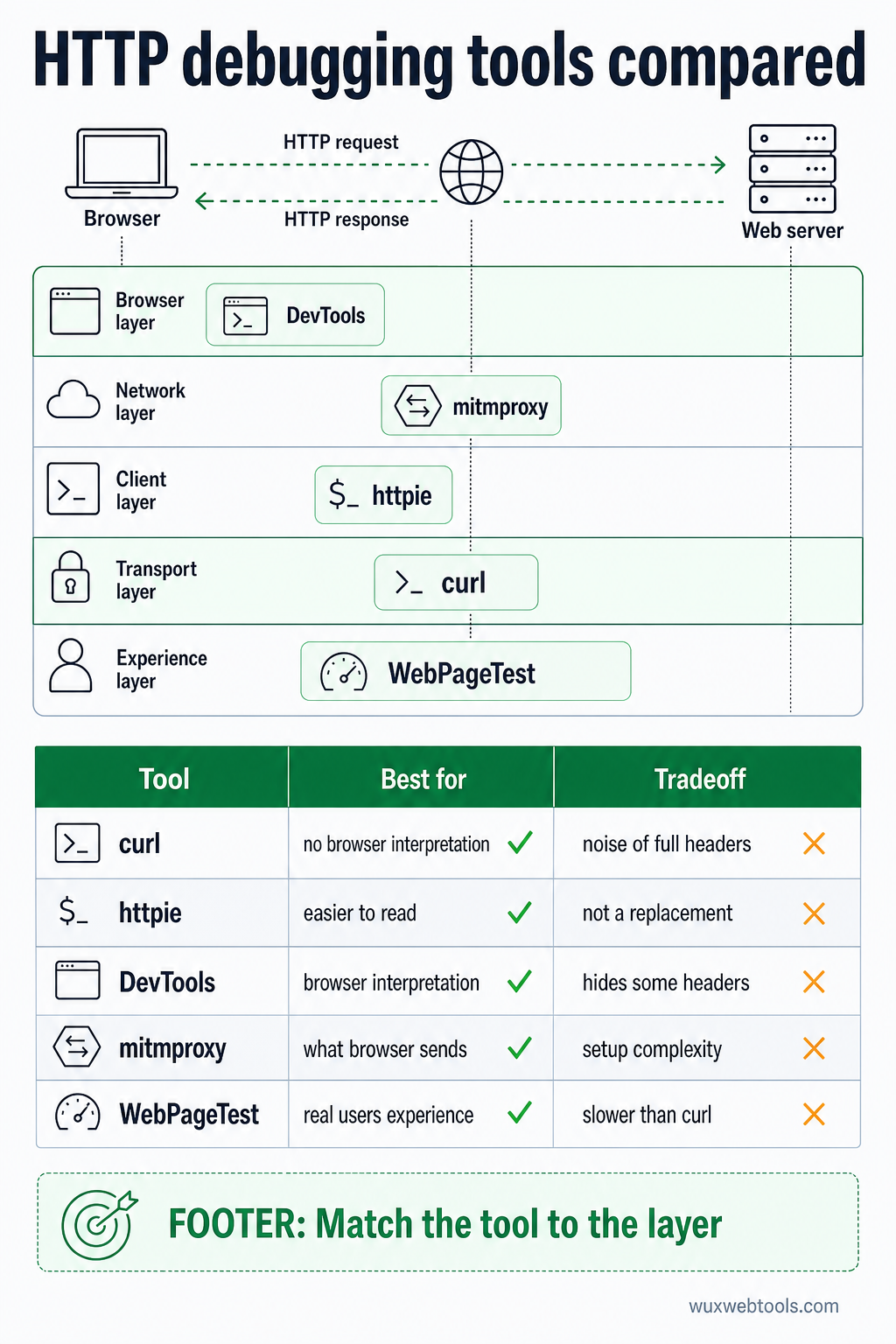
WebPageTest एक free service है जो अलग-अलग locations में real browsers से आपका page load करती है और आपको पूरी HTTP conversation दिखाती है। यह curl से slow है, लेकिन यह दिखाती है कि real users क्या experience करते हैं, CDN behavior, DNS resolution, और TLS negotiation सहित।
"Request Headers" और "Response Headers" views आपको ठीक वही दिखाते हैं जो browser ने भेजा और receive किया। "Waterfall" view हर request की timing दिखाता है, redirects सहित। यहीं आपको वे समस्याएँ मिलेंगी जो केवल certain regions या certain networks पर होती हैं।
WebPageTest main document के लिए redirect chain भी दिखाता है, और ज़्यादातर redirect problems यहीं होती हैं। यदि आपकी site http:// से https:// पर redirect करती है, फिर www. से non-www. पर, फिर / से /en/ पर, तो WebPageTest आपको सभी तीन steps और हर step में लगा समय दिखाता है।
इन HTTP fundamentals को validate और optimize करने में मदद करने वाले tools के लिए, Wux Webtools कई utilities प्रदान करता है जो पूरी तरह आपके browser में चलती हैं, जिनमें header analyzers और redirect checkers शामिल हैं जो सब कुछ client-side process करके आपकी privacy का सम्मान करते हैं।
जब headers झूठ बोलते हैं
सबसे कठिन HTTP समस्याएँ वे होती हैं जहाँ server contradictory headers भेजता है। कोई Cache-Control header no-cache कहता है, लेकिन कोई Expires header कहता है कि resource एक साल के लिए valid है। कोई Location header relative URL की ओर point करता है, लेकिन Content-Location header कहीं और point करता है। Browser को अनुमान लगाना पड़ता है कि किस पर भरोसा करे, और अलग-अलग browsers अलग तरह से अनुमान लगाते हैं।
जब ऐसा होता है, तो आपको raw headers उसी order में देखने पड़ते हैं जिसमें server ने उन्हें भेजा। curl -v यह करता है। mitmproxy भी करता है। Browser के DevTools कभी-कभी readability के लिए headers reorder करते हैं, जिससे समस्या छिप जाती है।
एक और common issue: ऐसे headers जो आपकी application ने नहीं, बल्कि CDN या load balancer ने add किए हों। यदि आप caching problem debug कर रहे हैं, तो आपको जानना होगा कि Cache-Control header आपकी app से आया या CDN से। curl आपको final result दिखाता है, लेकिन यह नहीं बताता कि हर header कहाँ से आया। इसके लिए आपको CDN bypass करना होगा (origin server को directly hit करके) और headers compare करने होंगे।
Redirect loop की समस्या
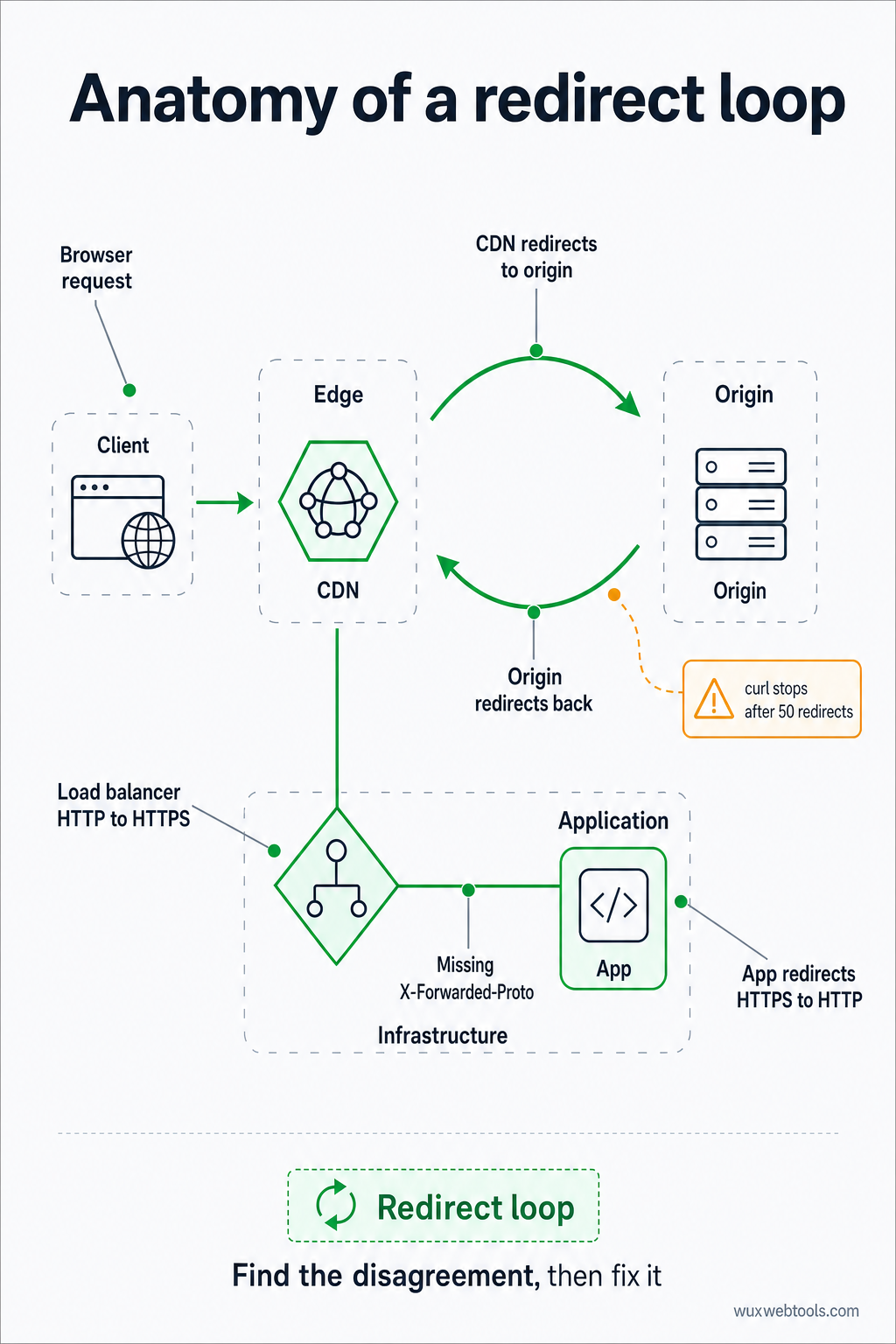
Redirect loops production में सबसे common HTTP problem हैं। ये तब होते हैं जब दो servers इस पर disagree करते हैं कि कोई URL कहाँ point करना चाहिए: CDN origin पर redirect करता है, origin वापस CDN पर redirect करता है। या load balancer HTTP को HTTPS पर redirect करता है, लेकिन app HTTPS को वापस HTTP पर redirect कर देती है क्योंकि उसे X-Forwarded-Proto header नहीं दिखता।
इसे debug करने के लिए, आपको पूरी redirect chain देखनी होती है, हर step पर Location header सहित। curl -L -v यह करता है, लेकिन infinite loops रोकने के लिए यह 50 redirects के बाद रुक जाता है। यदि आप उस limit तक पहुँच रहे हैं, तो आपके पास redirect loop है।
Fix आम तौर पर configuration change होता है: app को X-Forwarded-Proto header पर trust करने के लिए कहें, या CDN को उन requests को redirect करना बंद करने के लिए कहें जो पहले से HTTPS हैं। लेकिन जब तक आप loop नहीं देखते, आप इसे fix नहीं कर सकते, और browser हार मानने से पहले आपको कुछ redirects से ज़्यादा नहीं दिखाएगा।
पहले क्या check करें
जब production में कुछ break हो, तो इन्हें क्रम से check करें:
- Status code: क्या यह वही है जिसकी आपने expected की थी? 301 permanent है, 302 temporary है, 307 HTTP method preserve करता है। यदि आपको गलत code दिख रहा है, तो समस्या आपकी redirect configuration में है।
- Location header: क्या यह सही जगह point करता है? क्या यह absolute URL है या relative? Relative URLs current URL के against resolve होते हैं, जिससे unexpected results आ सकते हैं यदि base URL वह नहीं है जो आप सोचते हैं।
- Cache headers: क्या browser redirect cache कर रहा है? 301 redirect default रूप से cached होता है, जिसका मतलब है कि misconfigured redirect fix करने के बाद भी आपकी site घंटों तक break रह सकती है।
Cache-ControlऔरExpiresheaders check करें ताकि पता चले browser redirect को कितनी देर याद रखेगा।
- CORS headers: यदि request cross-origin है, तो क्या server सही
Access-Control-Allow-Originheader भेजता है? यदि नहीं, तो browser request block कर देगा, और आपको console में CORS error दिखेगा। इसे fix करने की एकमात्र जगह server के response headers हैं—आप browser में इसका workaround नहीं कर सकते।
- Timing: Request में कितना समय लगा? यदि यह slow है, तो क्या यह network latency है या server processing? Browser के DevTools और WebPageTest दोनों timing breakdowns दिखाते हैं जो बताते हैं कि समय कहाँ गया।
Privacy और headers के आसपास browser behavior कैसे बदला है, इस पर गहराई से देखने के लिए, 2026 में cookies के लिए क्या बदला और इसके बारे में क्या करें देखें, जिसमें recent browser updates के header और consent implications cover किए गए हैं।
मुख्य बातें
curl -L -vआपको पूरी redirect chain और सभी headers दिखाता है, बिना browser interpretation के- Browser का Network tab आपको दिखाता है कि browser ने response के साथ क्या किया, caching और CORS decisions सहित
mitmproxyआपको दिखाता है कि browser ने क्या भेजा, उन headers सहित जिन्हें browser automatically जोड़ता है- WebPageTest आपको दिखाता है कि real users क्या experience करते हैं, CDN behavior और regional differences सहित
- Redirect loops और contradictory headers सबसे common production problems हैं, और raw HTTP inspection के बिना invisible रहते हैं
FAQ
Q: curl browser से अलग headers क्यों दिखाता है?
A: क्योंकि browser automatically headers जोड़ता है (User-Agent, Accept, Cookie) और caching तथा CORS के लिए अपने नियम follow करता है। curl केवल वही भेजता है जो आप उसे भेजने को कहते हैं। Browser वास्तव में क्या भेजता है यह देखने के लिए mitmproxy या browser के DevTools का उपयोग करें।
Q: मैं ऐसा redirect कैसे debug करूँ जो केवल कुछ users के लिए होता है?
A: Check करें कि redirect user द्वारा भेजे गए headers पर depend करता है या नहीं: User-Agent, Accept-Language, Cookie, या IP address (X-Forwarded-For के via)। User ने जो same headers भेजे थे उन्हें भेजने के लिए curl use करें, या user की location से page load करने के लिए WebPageTest use करें।
Q: 301 और 302 redirects में क्या अंतर है?
A: 301 permanent है और browser को redirect cache करने के लिए कहता है (कभी-कभी हमेशा के लिए)। 302 temporary है और browser को इसे cache न करने के लिए कहता है। यदि आप sure नहीं हैं कि कौन सा use करना है, तो 302 use करें—आप बाद में हमेशा इसे 301 में बदल सकते हैं।
Q: मेरा redirect curl में काम करता है लेकिन browser में क्यों नहीं?
A: शायद इसलिए क्योंकि browser कोई पुराना redirect cache कर रहा है, या क्योंकि browser CORS या mixed content rules के कारण redirect block कर रहा है। Errors के लिए browser का DevTools console check करें, और Cache-Control headers check करें ताकि पता चले कि browser cached response use कर रहा है या नहीं।
Q: मैं CDN द्वारा add किए गए headers कैसे देखूँ?
A: CDN URL hit करने के लिए curl use करें, फिर origin server को directly hit करने के लिए (CDN bypass करते हुए) फिर से curl use करें। Headers compare करें। जो केवल पहले response में appear होते हैं, वे CDN से आए हैं।
<!-- tool-cta:start -->
💡 इसे आज़माएँ: रीडायरेक्ट समस्याओं की जाँच करते समय, Redirect Checker पूरी शृंखला को ट्रेस करता है और प्रत्येक चरण पर स्टेटस कोड और हेडर दिखाता है।
<!-- tool-cta:end -->
Sources
- curl documentation — curl command-line options और behavior के लिए official reference
- HTTPie documentation — httpie syntax और features की guide
- MDN Web Docs: HTTP redirections — HTTP redirect status codes और behavior की comprehensive explanation
- WebPageTest documentation — WebPageTest results और headers interpret करने का तरीका
अक्सर पूछे जाने वाले प्रश्न
curl browser से अलग headers क्यों दिखाता है?
मैं ऐसा redirect कैसे debug करूँ जो केवल कुछ users के लिए होता है?
301 और 302 redirects में क्या अंतर है?
मेरा redirect curl में काम करता है लेकिन browser में क्यों नहीं?
मैं CDN द्वारा add किए गए headers कैसे देखूँ?
स्रोत और आगे की पढ़ाई